Guidance Corner: Space reservation instructions

Belongs to themes:

By selecting a degree programme you are able to see the general content as well as the possible degree programme-specific content.

Welcome to the Guidance Corner!

The Guidance Corner is a low-threshold meeting place where university staff, student organizations, and partners can organize activities related to studies, wellbeing, and community for members of the university. Partners may hold events in the space in collaboration with university actors. In addition, the space can be used by different university services, sectors, and units for pop-up activities.

Regular events open to the university community are organized in the Guidance Corner throughout the academic year. Events must be open to anyone interested. The space cannot be reserved for small-group work or meetings limited to a specific group. The Guidance Corner follows the principles of a safer space.

You can find the Guidance Corners at:

  • Kaisa House, 3rd floor (next to the main entrance)
  • Viikki Infocenter Korona, 1st floor (in the library)

This page provides practical instructions for using the Guidance Corner. You can explore student events held in the space via the university’s event calendar.

Details of Guidance Corners

Guidance Corner, Kaisa House (Fabianinkatu 30)

Guidance Corner is on the third floor of Kaisa House, right next to the entrance on Fabianinkatu.The space can accommodate max. 30 people (e.g., information session). For small groups, the space works best for a group of up to 15 people.
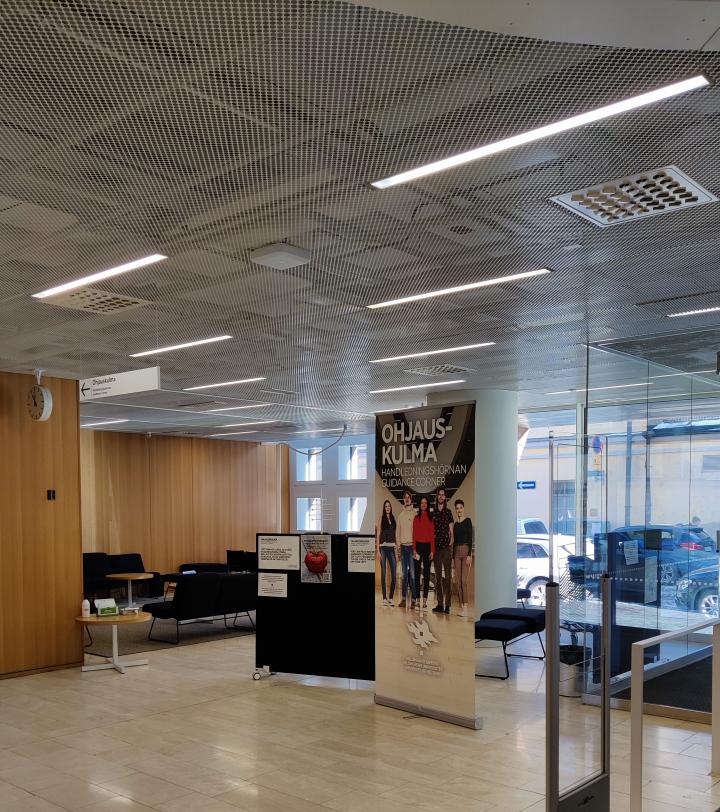
Kaisa house Guidance Corner

Guidance Corner, Info Centre Korona Library (Viikinkaari 11)

Guidance Corner Library is on the 1st floor of Info Centre Korona, in front of garden Niili. The space can accommodate max. 15 people. The space is well suited for e.g., small group and discussion events.
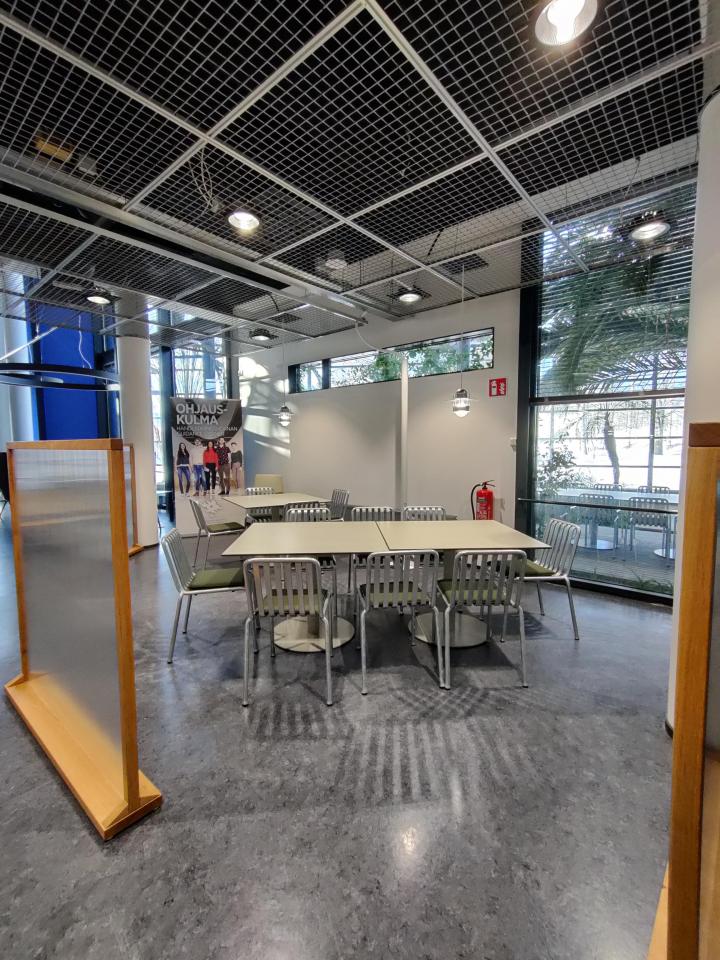
Viikki Guidance Corner Library

Reservations and Catering

After reviewing the intended use the space and checking availability in the O365 booking calendar, you can submit a reservation request:

Kaisa House Guidance Corner (kaisa-talo, Ohjauskulma):

Infocenter Korona Guidance Corner (Infokeskus, Ohjauskulma Kirjasto):

Snacks and non-alcoholic beverages may be served in Guidance Corners. You can bring your own refreshments to the event or order them a week before the event from Well Kaisa-talo or Porthania or infokeskus@unicafe.fi. Please clean up all catering at the end of the event.

Guidance Corner furniture

The Guidance Corner has been designed so that the furniture can be moved around depending on the activity. If you make major changes during your booking, please move the furniture back to its original position. 

Guidance Corner furniture may not be taken out of the Guidance Corner! 

Guidance Corner, Kaisa House

  • Roll-up banner (please do not move; placed for visibility)
  • Two armchairs
  • Sofa set
  • Three small wooden low tables
  • Three white round adjustable-height tables
  • Two black chairs
  • Two coat racks
  • Two movable partitions
  • Display screen
  • 20 extra chairs on a movable cart

Guidance Corner, Viikki Infocentre Korona

  • 12 metal chairs
  • Three tables (4 persons/table)
  • Display + speaker system
  • Roll-up
  • Three screens/dividers

The tables are heavy and should be moved so that they do not scratch the floor mat.

Display Screen

The space includes a display that can be used by event organizers. Turn it on using the power button on the right side.

The screen has various cables (including HDMI) for connecting a laptop. Audio (e.g. videos) can be played through the display’s speakers.

After use, lift cables off the floor to prevent damage when people move around or furniture is rearranged.

Promoting your events

The responsibility for promoting events organised in the Guidance Corner belongs to the event organiser. The Guidance Corner does not have its own social media accounts where events could be publicised.

  • It is recommended that you publish bulletins on upcoming events in the Studies service. Also use other possible channels to reach as many students as possible.
  • If your event is open to all students, write a trilingual ad for it to be displayed on the kaisa House Guidance Corner’s info screen and send material to opiskelijaviestinta@helsinki.fi
  • You can also add the event in the University's events calendar. If you choose Opiskelijatapahtumat (student events) as the event category, the event will also be shown on the frontpage of the Studies service, under the Events heading. More information on the use of the events calendar can be found on Flamma (requires logging in).
  • If students must sign up for the event, please mention the deadline for filling out the form or the maximum size of the group.
  • Guidance Corner does not have its own social media accounts. If you would like to promote your event on the university’s Instagram, please contact opiskelijaviestinta@helsinki.fi. If you would like to share information about events on the Library’s Instagram, please contact hulib-viestinta@helsinki.fi

Instructions for organising remote events

Questions to consider when planning a remote event   

  • How can I create an atmosphere of open discussion and dialogue as soon as the event begins?
  • Does the event involve work in small groups? How will this work be introduced so that it feels as meaningful as possible to students and so that they are not intimidated by it?
  • What added value, if any, is provided by the participants having their camera on during the event? Or will students feel more relaxed if they are not expected to have their camera on? 

Please note the following when writing the event description: 

  • Mention in advance if the event includes interactive elements. It is good to notify potential participants if the event includes small group work or active discussion. 
  • Add the email address of the service provider or event organiser to the description. This enables students to, for example, ask questions about the event in advance or to cancel their participation by directly contacting the organiser. 

Consider the significance of the start of the event 

It may be easier for participants to get actively involved if they are invited to engage from the very beginning of the event. So consider whether to start with a short warm-up assignment before the presentation component begins to provide the participants with the opportunity to get in on the conversation right away. 

At the beginning of the event 

  • Principles for a safer space must be followed, which means that all participants are accepted as they are.
  • Clarity is key: the presentation of the event programme and goal, if any, right at the beginning as well as clear instructions for various parts of the event often reduce uncertainty and misunderstandings.
  • Explain the principles concerning camera and microphone usage. 
    • If it is requested that participants have their camera on, the organisers should set a good example by having their camera on whether or not they are speaking at the time. Also explain why participants should have their camera on.
  • Describe what people should do if they wish to speak during the event. For example, is the chat to be used or should people just unmute their microphone (or do both), and can people make comments at any time or only after the organiser has invited them to do so? 
  • You can also tell students how they can blur their background or change their name in Zoom/Teams. You can find the Instructions for online event participants on the Studies Service.