Making a video in the Unitube studio
Belongs to themes:
By selecting a degree programme you are able to see the general content as well as the possible degree programme-specific content.
There are three Unitube studios: One in Kaisa House on City Centre Campus, a second one in Exactum on Kumpula Campus and a third studio in the Infocentre building on Viikki Campus. The studios are equipped primarily for recording videos to be published in Unitube and live streaming through Unitube. Moreover, the audio and video from the studio equipment is also available via USB. Thus, the image and sound can be used in or recorded with software available on computer the USB cable is connected to. Use of the Unitube studios is a basic service and offered free of charge. Just like in other Unitube rooms, recordings are automatically transferred to the Unitube uploader, and streaming is possible via the room's streaming page.The studios are designed to be used autonomously on a self-service basis. Thus a single person can both operate the equipment and appear in the recordings. Faculty members can book the studios for themselves as well as for their students. Students cannot make bookings in the Outlook calendar themselves but are welcome to use the studios as long as the use is closely related to University of Helsinki teaching, research or communication needs.
In the Viikki studio you can also use separate podcasting equipment, which has its own page for instructions here.
The Unitube studios are administered by the Educational Technology Services (edutech@helsinki.fi) who also provide support and training for the users. Please schedule training and support in advance as we are not always available and there is no emergency duty in the studios.
| Please note: The Info Centre's studio is currently closed due to extensive repairs following water damage in the building. We are monitoring the situation and will reopen the studio as soon as possible. |
|---|
The studios can be booked only by University of Helsinki Staff members. Students are welcome to use the studios if it has been booked by their teacher or any other staff member.
The Unitube studios can be booked via the O365 calendar (click for instructions: Outlook, OWA). NOTE! If you are logged in to Office 365 with the browser you attempt to open the calendar link in, the calendar might try to open in your personal OWA where it flickers and closes after a while. In that case, copy the calendar link and open it in another browser from the address bar.
The links below let you check the availability of each studio during the next three months or so. The location and streaming URL are listed below. You can reach us either via email edutech@helsinki.fi (primary contact method) or by calling the custodian (in urgent situations):
Please note the studios are available only during the opening hours of each building and Kaisa's studio on mon-fri 8-20 and sat 11-17. Caretakers only let in people who have successfully booked the studio.
NB: Due to the replacement of printers at the University, the ID cards used for logging in need to be re-registered. Therefore, before using the studio, please register your card with a new Ricoh device. See Flamma for instructions.
*) A print card is an RFID chip card that you use to identify yourself to HY printers for their use, even if you do not print anything with them – it can be an HSL travel card, staff card, or something else. NOTE: A new print card must be registered at least one day before you use the studio. See the instructions for authentication (on the Uniprint page).
All three studios are operated on a self-service basis like all other Unitube-services. While a single person can operate the equipment and appear in the recordings, having an assistant may help immensely depending on the users and the intended use.
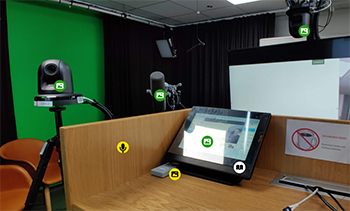 We recommend reserving plenty of time when using a studio for the first time. In principle it is possible to be recording within a minute or so after entering the studio. In most cases, however, fifteen minutes is a more realistic set-up time. Studying these instructions will help, but as technology tends to always be more complex than one would think, we do recommend having a flexible schedule. The workflow and a number of possible uses are described in the videos and pdf-instructions.
Kaisa studio instructions FI_EN.pdf
Virtual visit to the Kaisa House studio
Virtual visit to the studio in Kumpula
Kumpula studio instructions.pdf (EN)
Viikki studio 360-image with instructions (EN)
Viikki studio control panel quick instructions (FI / EN)